Solving the ₹1 Mismatch: Under the Hood of Ambill’s Multi-Pass TDS Reconciliation Engine
Akanksha Upadhyay
View LinkedInFor finance teams in Indian enterprises, TDS (Tax Deducted at Source) reconciliation is a recurring monthly nightmare. Under Indian tax laws, clients deduct tax (usually 1% to 10% under sections like 194C, 194J, etc.) before paying your invoices. They then deposit this tax with the government under your company’s PAN.
Eventually, these deductions appear in your official Form 26AS (Tax Credit Statement) generated by the Income Tax Department.
To claim these tax credits, your accounting team must verify that every single rupee of TDS deducted in your books (the ledger) matches what is deposited with the government (Form 26AS). If there is a mismatch, your business risks losing tax credits or, worse, receiving a tax demand notice.
Doing this manually across thousands of transactions is nearly impossible. Differences in timing, consolidated client filings, rounding errors, and missing identifier details (like TANs) make simple spreadsheets useless.
⏱️ TL;DR for CFOs
- The Core Problem: Manual TDS reconciliation causes leakage of tax credits, wastes hundreds of hours of finance bandwidth, and increases compliance risk.
- The Solution: Ambill’s automated reconciliation engine maps caret-delimited Form 26AS reports directly to internal ledger books using fuzzy logic and multi-pass algorithms.
- The Bottom Line: The engine achieves a 95.4% automated match rate, turning a multi-day manual operation into a 10-second verification process. It immediately flags unrecorded tax credits (saving money) and un-deposited client deductions (stopping leakage).
The Core Process Flow
Ambill’s reconciliation engine operates as a multi-stage pipeline that ingests data from two distinct sources, cleanses it, aligns the entities, and runs a multi-pass matching processor.
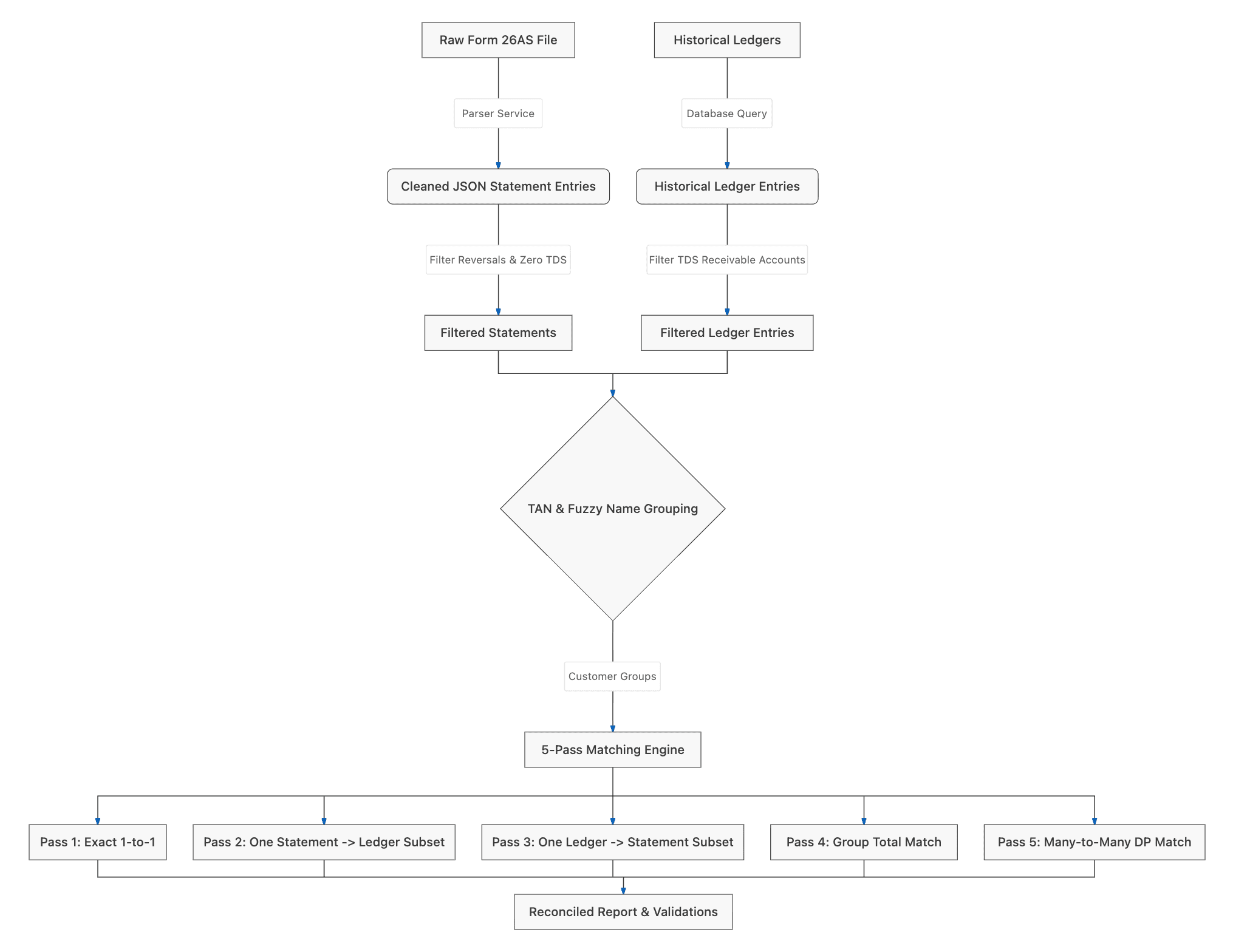
Step 1: Ingesting and Parsing Government Data
Form 26AS files downloaded from the TRACES portal are typically unstructured text documents formatted with caret (^) delimiters.
Ambill’s ingestion pipeline automatically reads these raw documents, scans line-by-line, and isolates the specific section containing tax credit details. The engine splits the data rows, maps them to standard columns, and extracts key details like:
- Deductor Name and TAN (Tax Deduction and Collection Account Number)
- Tax Section Codes (e.g., 194J, 194C)
- Booking dates and transaction dates
- Gross transaction amounts and actual tax deducted
Step 2: Filtering Reversals and Corrections
A common reason simple matching tools fail is that they get tripped up by booking corrections.
In Form 26AS, if a client makes a mistake and subsequently corrects it, the portal lists both the original entry and a correction entry. The Ambill engine filters these out to prevent false matches:
- Zero TDS entries are discarded as they don't represent real credits.
- Negative/Reversal entries (used by the government to offset previous mistakes) are skipped.
- Superseded Original Bookings (which were later updated by the client) are excluded so only final, settled credits are analyzed.
Step 3: Resolving Customer Identities (Fuzzy Name Matching)
Ideally, we would match transactions using the client's TAN. However, accounting ledgers are often created manually by accountants who might omit the TAN or make typos in the company name (e.g., "Cove Offices" in the ledger vs "Cove Offices Private Limited" in government records).
Ambill resolves this using a specialized alignment process:
- TAN Verification: If TANs are available in both sources, the customer ledger and statement are aligned immediately.
- Noise Words Stripping: If TANs are missing, we strip generic legal suffixes like
Pvt,Ltd,LLP,Corp,Co,Services,Solutions. - Word-Boundary Token Matching: We verify that all meaningful parts of the shorter name are present in the longer name. This prevents mismatched entities (e.g., making sure "Cove Offices" matches "Cove Offices LLP" but does not accidentally match an unrelated group like "Cove Offices OMR LLP").
- Typo Correction (Levenshtein Distance): For minor spelling variations, the engine calculates the number of single-character edits required to turn one word into another. This ensures minor typos in customer names do not break the matching pipeline.
Step 4: The 5-Pass Matching Engine
Once the statements and ledger entries are grouped by customer, the engine initiates its matching sequence. Running this in passes ensures we resolve easy matches first, reducing the remaining search space for complex combinations and avoiding false positives.
Pass 1: Exact 1-to-1 Match
Matches a single Form 26AS credit directly to a single ledger entry of the same amount. The engine accounts for a small configurable tolerance (usually ₹1.0) to handle minor decimal rounding differences.
Pass 2: One-to-Many (One Statement to a Ledger Subset)
Clients often file tax credit quarterly or monthly as a single consolidated lump sum, while your internal ledger records TDS invoice-by-invoice.
To solve this, the engine runs a Subset Sum Search. If the engine sees a single government credit of ₹15,000 for a customer, it searches the customer's ledger for a combination of transactions that sum up to exactly ₹15,000 (e.g., invoices of ₹5,000, ₹7,000, and ₹3,000). When it finds the subset, they are linked and reconciled.
Pass 3: Many-to-One (Many Statements to one Ledger Entry)
The reverse of Pass 2. If your accounting team posted a consolidated ledger entry but the client deposited the tax in smaller individual batches, this pass finds a combination of individual Form 26AS entries that sum up to the ledger entry.
Pass 4: Group Total Match
If individual transactions cannot be paired, but the consolidated total of all remaining unmatched statements matches the total of all remaining unmatched ledger entries for that client, they are matched as a Consolidated Group Match.
Pass 5: Many-to-Many Match
The ultimate resolver. When a client files several consolidated returns and you have several invoice ledger entries, the engine generates combinations of remaining statements and checks if they match a subset of ledger entries. To ensure optimal performance, this complex matching is restricted to smaller pools of remaining entries.
Step 5: Automated Audits and Warnings
Finally, the engine compiles a list of discrepancies and issues automated audits:
- TDS Sum Variance: A validation warning is raised if the aggregate TDS amount in your ledger differs from Form 26AS, indicating an overall mismatch.
- Missing TAN Warnings: Identifies transactions recorded under clients who do not have a TAN configured in the database, allowing accounting teams to clean up their customer master data.
Conclusion: Strategic Financial Impact
Automating TDS reconciliation is more than just an operational improvement; it is a strategic necessity for maintaining a healthy corporate balance sheet.
By employing a multi-pass algorithmic approach that accounts for corrections, fuzzy customer naming, and consolidated matching, Ambill’s reconciliation engine achieves an outstanding 95.4% automated match rate.
For the CFO and finance leadership, this translates to three massive advantages:
- Leakage Prevention: Instantly pinpointing client deductions that were never deposited with the tax department, allowing teams to follow up on outstanding funds with concrete data.
- Plugging Unclaimed Credits: Uncovering legitimate tax credits sitting with the government that were omitted in internal books, boosting the bottom line.
- Audit Readiness: Producing clean, error-free reconciliation trails for annual statutory audits, minimising compliance risks and potential tax notices.
Ultimately, by turning a tedious spreadsheet process into a 10-second automated check, Ambill empowers enterprise finance teams to stop chasing missing rupees and start focusing on high-value financial planning and strategy.