The Spreadsheet Trap: Why Reconciling Bank Statements in Excel is a Treasury Liability
Gaurav Singhal
View LinkedInAsk any enterprise finance team how they reconcile their bank statements, and the answer is almost always the same: Microsoft Excel.
Excel is the default tool of corporate finance. It is flexible, familiar, and powerful. But when it comes to generating your monthly Bank Reconciliation Statement (BRS) at scale, relying on spreadsheets is not just inefficient—it is counter-beneficial.
Treasury teams often find themselves spending hours auditing their own spreadsheets rather than reconciling their bank accounts. Here is why Excel-based BRS generation is a corporate treasury liability, the common errors it introduces, and how smart automation breaks the cycle.
1. The Anatomy of Spreadsheet Reconciliation Errors
When you try to match thousands of bank statement transactions against tens of thousands of ERP ledger entries in Excel, minor data discrepancies spiral into major closing delays. Some of the most common spreadsheet reconciliation errors include:
A. The Silent Date-Parsing Bug
One of the most frequent errors in Excel occurs during date ingestion. If your ERP ledger uses a regional format (like the Indian DD-MM-YYYY) and your system defaults to a US format (MM-DD-YYYY), Excel will silently swap months and days.
- The Result: A transaction cleared on April 1st (
01-04-2026) is incorrectly parsed by Excel as January 4th (04-01-2026). Transactions are pushed to incorrect periods or future dates, creating phantom differences that require hours of manual checking to resolve.
B. Broken Lookup Ranges and Hardcoded Formulas
Spreadsheets rely on complex formulas (VLOOKUP, SUMIF, INDEX/MATCH) to pair entries. Over time, these formulas break. A common mistake is hardcoding formula ranges.
- The Result: If a
SUMIFformula is written to check accounts in rows 87 to 150, but a new clearing account is introduced at row 44, the spreadsheet completely ignores that account. Billions in transit can go unchecked because of a single hardcoded cell range.
C. Duplicate and Orphan Entries
When exporting raw ledger files from ERPs or downloading statements from banking portals, duplicate rows often slip through. Excel has no native database constraints to prevent you from double-counting a payment or matching the same UTR code to two different transactions. Furthermore, exporting transactions from ERPs can result in "orphan" lines where debits and credits are separated, breaking the ledger’s balance.
2. The Validation Trap: Auditing the Spreadsheet, Not the Cash
Treasury teams are highly analytical, and they know spreadsheets are fragile. To protect against formula failures and copy-paste errors, teams build complex, multi-point validation checklists inside their Excel files.
These validation tables run multiple checks:
- Comparing the sum of matched bank ledger lines against reporting currency amounts.
- Checking that the overall ERP ledger balances to zero (double-entry validation).
- Verifying that the calculated statement closing balance matches the final running total.
- Scanning ledger entries to ensure no transaction was missed by the lookup formulas.
The Irony of the Checklist
While these checks are mathematically sound, they highlight a major structural irony: treasury teams are building complex validation checklists simply to audit the spreadsheet itself.
These checks exist to verify that the copy-paste was successful, that no formula broke, and that the sheet's math balances. They do not solve the actual treasury backlog. The core problems—unmatched bank lines, split customer payments, unidentified bank fees, and outstanding cheques—remain completely unresolved.
You end up with a mathematically perfect spreadsheet that tells you why your matching formulas failed, but still leaves you with a backlog of unallocated cash.
3. The Ambill Way: Reconciling Cash, Not Spreadsheets
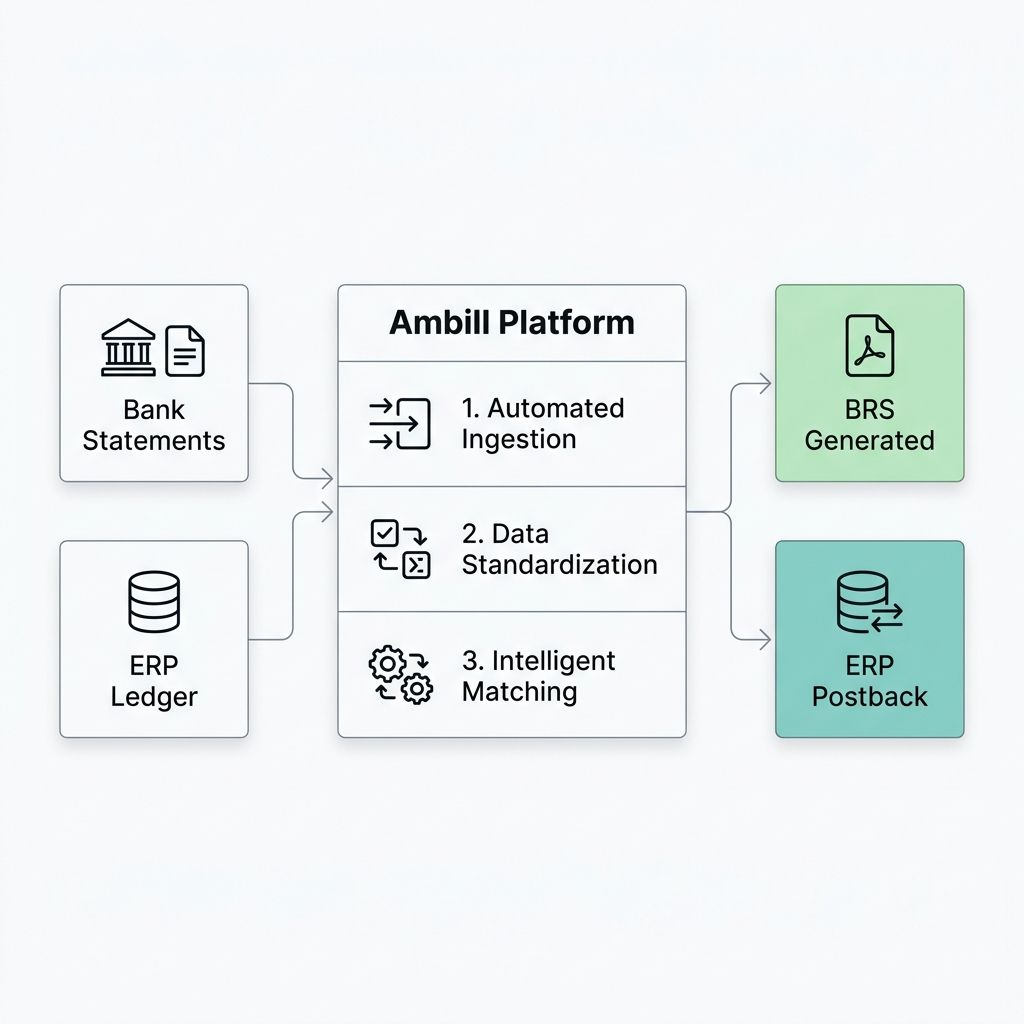
Ambill replaces the fragile, spreadsheet-driven workflow with a secure, automated treasury layer. Instead of building checks to audit your tools, Ambill automates the entire ingestion and matching process so you can focus on managing your cash.
Programmatic Ingestion and Standardization
Ambill automatically ingests bank statements and ledger data, standardizing dates, references, and amounts programmatically. The date-parsing bug is eliminated entirely because data is validated before comparison.
Automated Split-Payment Matching
When a single bank transaction represents a bundle of multiple ERP invoices, Ambill’s split-payment solver groups and matches the entries in seconds. There are no lookup formulas to break, and no hardcoded cell ranges to overlook.
Automatic ERP Posting & BRS Generation
Once matching is complete, Ambill dynamically generates your final Bank Reconciliation Statement (BRS). Any identified discrepancies—such as bank charges, interest payments, or exchange rate differences—are routed to an exception queue, allowing you to generate pending journal entries and post them directly back to your ERP (like Microsoft Dynamics 365, NetSuite, or SAP) with a single click.
The Bottom Line
Reconciling your bank statement in Excel is like checking your math twice on a calculator with a sticky keyboard. You spend more time auditing your calculations than solving the problem.
Ambill removes the spreadsheet risk entirely. By automating data cleaning, matching, and ERP posting, Ambill delivers a 97% match rate and reconciles ~7,000 transactions against ~23,000 ledger entries in under a minute—giving you absolute cash visibility and an audit-ready BRS without the spreadsheet headache.
Ready to close your books faster and eliminate spreadsheet risk? Discover how Ambill can transform your treasury reconciliation today.